
Reward Branding
Overview
The branding of a Reward is designed to make it as clear as possible to the user on what the reward is, how to use it, and get them excited to use it. Rewards, like Ways to Earn, are designed to be visually enticing and able to feel a part of your brand. As a result, there are a few different attributes of the Reward that are important to know about.
As with all of our branding as well, we use intelligence behind the scenes to save time on certain parts of colors, and text, which we will note. These can be overridden if desired.
Attributes of Reward branding
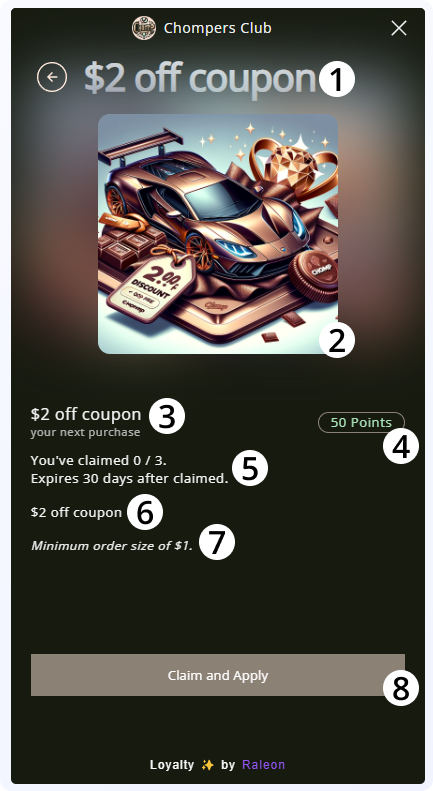
- Reward H1 Title: The name of the reward. This should be clear, such as "$5 Off" or "Free Shipping". Some brands include additional text to make it fun or personal like "$5 Off For You" which is great. Just make sure it's clear what the user is getting!
- This uses the text color from branding.
- Reward Image: The image that was provided when configuring the reward. This may come from a Reward that's configured to be redeemable from the shop, or one that is granted directly from a Way to Earn.
- This is an image that should be no smaller than 240x240. The most important thing here is to keep the 1x1 aspect ratio. For instance, 500x500 is OK as we will automatically downsize it.
- Reward H2 Title: The same title as the H1, but smaller and repeated for clarity.
- Points Pill: This shows the cost, in points, of redeeming a reward.
- The text in the points pill uses Link Secondary Color from branding
- The border of the pill uses Button Background Color from branding
- These colors can be overridden
- Reward Information: This text is automatically generated based on what's been configured for the reward in Raleon admin
-
- This text will be automatically translated by Raleon.
-
- Reward Description: This text comes from reward description in the admin and is often used to provide more friendly brand language to the reward and make sure its details are clear.
- Reward Restriction Information: This text is automatically generated based on restriction details for the reward.
- This text will be automatically translated by Raleon.
- Claim & Apply Button: This text is automatically generated by Raleon. If the customer has the required amount of points, when clicking claim and apply, they will spend their points to claim the reward, and the reward will automatically be applied to their cart. They can remove the reward later during checkout if they so desire.
- The button color used is Button Background Color from branding
- The button text color used is Button Text Color from branding
Updated about 1 year ago