
Way To Earn Branding
Overview
The branding of a "Way to Earn" (WTE) is designed to make the user want to complete the Way to Earn, and also to ensure that there's control for you (the brand) to make it feel as a part of your brand as possible. As a result, there are a few different attributes of the Way to Earn that are important to know about.
As with all of our branding as well, we use intelligence behind the scenes to save time on certain parts of colors, which we will note. These can be overridden if desired.
Attributes of Way to Earn branding
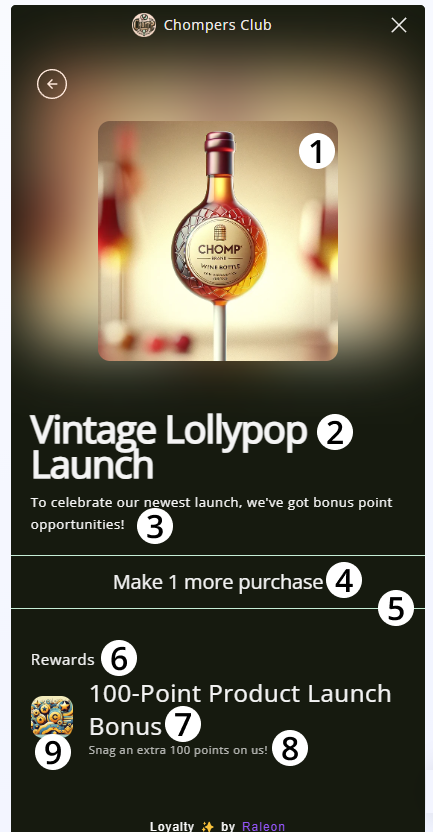
- The Way to Earn image: This is an image that should be no smaller than 240x240. The most important thing here is to keep the 1x1 aspect ratio. For instance, 500x500 is OK as we will automatically downsize it. To make it blend and feel nice, we also use it in the background and blur it. The image is automatically rounded to keep everything consistent.
- Title: The title is what the user sees on the home screen, and should indicate what the user must do to complete the way to earn or get them excited about it. This is using the text color from branding.
- Subtitle: The subtitle is often used to create further understanding of the opportunity (as demonstrated above) or to clarify the offering. For instance, brands may also say "To celebrate our new launch, you will get a bonus after 4 purchases"
- This uses the text color from branding.
- Way to Earn Action: This is what the customer must do to complete the Way to Earn. The action section is dynamic. For instance, if it the Way to Earn was "Make 4 purchases", but they've already made 3, then as demonstrated above, it will dynamically update to say "Make 1 purchase" so they know how many is left. This helps remove confusion for the customer.
- This uses the text color from branding.
- Action Line: The action line just visually indicates for the user where to look to know what actions must be completed for the Way to Earn.
- This uses link text color from branding
- Rewards Subtitle: This denotes what rewards a customer gets after completing a Way to Earn. This text is not configurable by default and is automatically translated.
- This uses the text color from branding
- Reward Title: The name of the reward as configured in the admin.
- Multiple rewards will be listed here if there are more than one.
- This uses the text color from branding
- Reward Subtitle: The subtitle text as configured from the reward in the admin.
- This uses an automatically adjusted version of the text color from branding
- Reward Image: A smaller version of the image configured in the admin as the reward. If the reward is able to be received (like a coupon) this same image will be used on the reward itself, but bigger.
Updated about 1 year ago